
Use case
Different prices for online store and POS
Sell the same product at one price online and a different price at the register, on any Shopify plan. PriceMux shows one price to your online shoppers and a different one to your in-store customers — no duplicate products, no theme code, no Shopify Plus required.
Compatible with Shopify Basic and above. Removing the shipping at the register requires Shopify POS Pro — a paid Shopify add-on, billed per location (see Shopify's POS pricing), not the free POS Lite. On POS Lite the in-store discount can't run, so the register would charge the online price.
Why a different in-store price is a years-old Shopify sore spot
The Shopify Community thread "Shopify POS set different price than Online Channel" has been an unresolved request for years. Out of the box, Shopify uses one price for a product across every sales channel, so whatever shows on your online store also rings up at the register. Owners who need a different in-store price end up taping together manual discount codes at checkout, or keeping a whole second copy of their catalog.
The native ways to split prices have hard plan gates:
- Shopify Markets per-region price lists — gated to the Shopify plan and above (Basic stores lost access after the April 25, 2025 cutoff), and they split prices by country, not by sales channel.
- Shopify B2B catalogs — Plus-only, and they only reach logged-in Company accounts, not the everyday shopper browsing your store.
- Manual discount codes at the register — slow to ring up every time, and they don't scale across thousands of products or several store locations.
PriceMux fills the gap: it sets the online price, then removes the difference automatically at the register — works on Basic and up, with no extra work for your cashier.
How it works
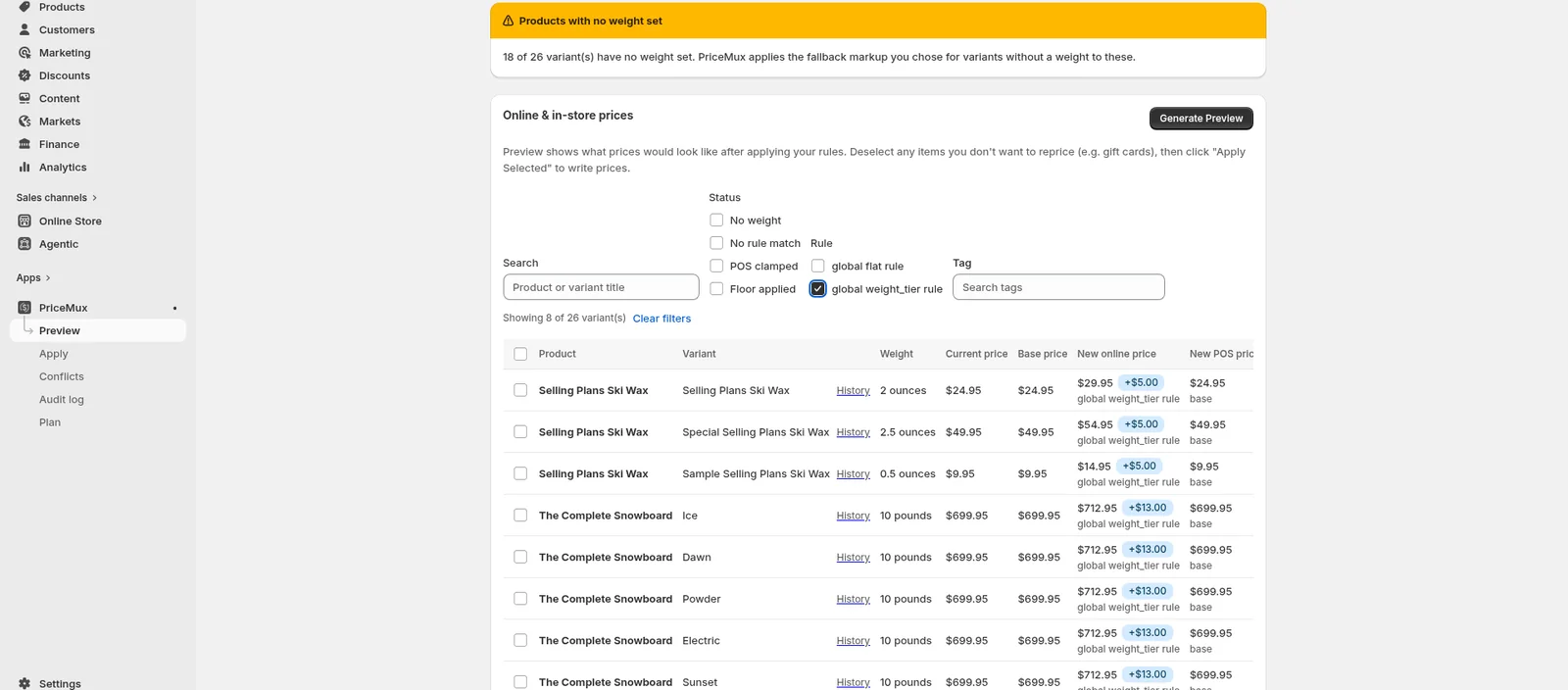
Say a 25 lb bag of dog food costs $45 in your store and about $10 to ship. PriceMux lists it at $55 online with shipping included, and rings it up at $45 at your register — the same product, two correct prices. Here's how you set that up:
-
1. Pick what the rule covers
A rule can cover your whole store, one collection, one tag, a single product, or a single product option. Use one store-wide rule for "online includes shipping, the register doesn't," or aim a rule at a clearance collection that's cheaper in store than online.
-
2. Set the online price
The online price comes from the rule — a weight tier, a fixed markup, a percentage, or a one-off price for a single product. Your base price stays untouched in Shopify as the record of what you started from; PriceMux only sets the online price on top of it.
-
3. Set what happens at the register
At the register, PriceMux adjusts the price automatically. Common setups: "take the online shipping markup back off in store," "charge the base price in store while online includes shipping," or "run an in-store-only clearance below the online price."
-
4. Your prices stay where they belong
With some pricing apps, a wholesale or markup price accidentally shows up on your public store, Facebook shop, or Google listings. PriceMux keeps each price on the right channel, so your online price and your in-store price never leak into the wrong place.
Common omnichannel pricing patterns
In-store-only discounts
Run an in-store-only clearance on overstock without changing your online prices. Tag the products, set them cheaper in store than online, and the register shows the markdown automatically.
Different prices for different locations
If you have more than one store, you can set in-store prices per location — handy when costs or local promotions differ from one shop to the next.
Keep POS and online prices in step
Already charging the same price online and in store? PriceMux keeps them in step when your base price changes — no updating both by hand.
Pricing for other sales channels
The same rules that separate your register price from your online price also work for other connected sales channels — so your wholesale or partner pricing stays off your public store.
Why PriceMux over competitors
- Works at the register. Several well-known pricing apps don't work with Shopify POS at all. PriceMux adjusts the price right inside POS, with no extra steps for your cashier on each sale.
- No duplicate products. We change the price on your existing product — we don't create extra copies. So nothing breaks your Google Shopping feed, your inventory apps, or your store filters.
- No theme code. PriceMux never edits your theme. If you ever uninstall, your store keeps working with nothing left behind.
- Flat monthly pricing. No per-order fees, no commission, no "the price keeps rising" surprise. Free / Starter / Growth / Pro tiers — see the pricing page.
- Audit log + 1-click rollback. Every price change is recorded, and you can undo any of them in one click. Change prices in bulk with confidence.
Related use cases
Free shipping margin
Weight-based pricing that includes shipping in the online price, then removes it at POS. Works on Shopify Basic and up.
Wholesale and B2B tier pricing
Customer-tag-based rules for wholesale tiers and B2B operators on Basic and up. No duplicate products, no theme code, no $2,500/mo floor.
Set different prices online vs in store
Install PriceMux, pick what a rule covers, preview the new prices, and apply. Works on Shopify Basic and up — no Plus, no Markets, no B2B catalog required.